Blog
April 20, 2026
A Seamless Transition Guide to Fiber Internet

You deserve a fast, dependable internet connection when working from home, helping your kids with their schoolwork or relaxing with your favorite streaming shows. If your current internet service doesn't keep up with your daily life, it's time for an upgrade that can transform your routine. While internet providers have historically overlooked potential customers located in rural areas, that's changing.
Luckily, switching to fiber internet is easier than you think. This guide walks you through a simple, five-step process that makes your transition effortless — with no stress or downtime.
1. Check Availability and Choose Your Plan
Fiber is more reliable than cable , DSL or satellite — especially in underserved areas where fast, dependable internet has traditionally been scarce. Use an online availability checker to see what's available in your neighborhood.
After confirming you have service in your area, explore plans to find a fit for your family's work, school and entertainment needs. Look for transparent pricing agreements that don't lock you into restrictive annual contracts or charge hidden fees.
2. Schedule Your Installation
Once you've selected your plan, schedule a fiber installation appointment for a convenient time when an adult can be home. The visit typically takes two to three hours, during which a technician will install the outdoor fiber line , an indoor optical network terminal and your new router.
Don't rush to cancel your outdated internet service yet. During the transition, you'll want to remain connected to the internet for work, school and everything else that matters. Wait for your tech to finish installing and testing your upgraded fiber connection before contacting your old provider to make the final break.
This approach guarantees zero downtime. It's a straightforward process designed with your convenience in mind.
3. Installation Day
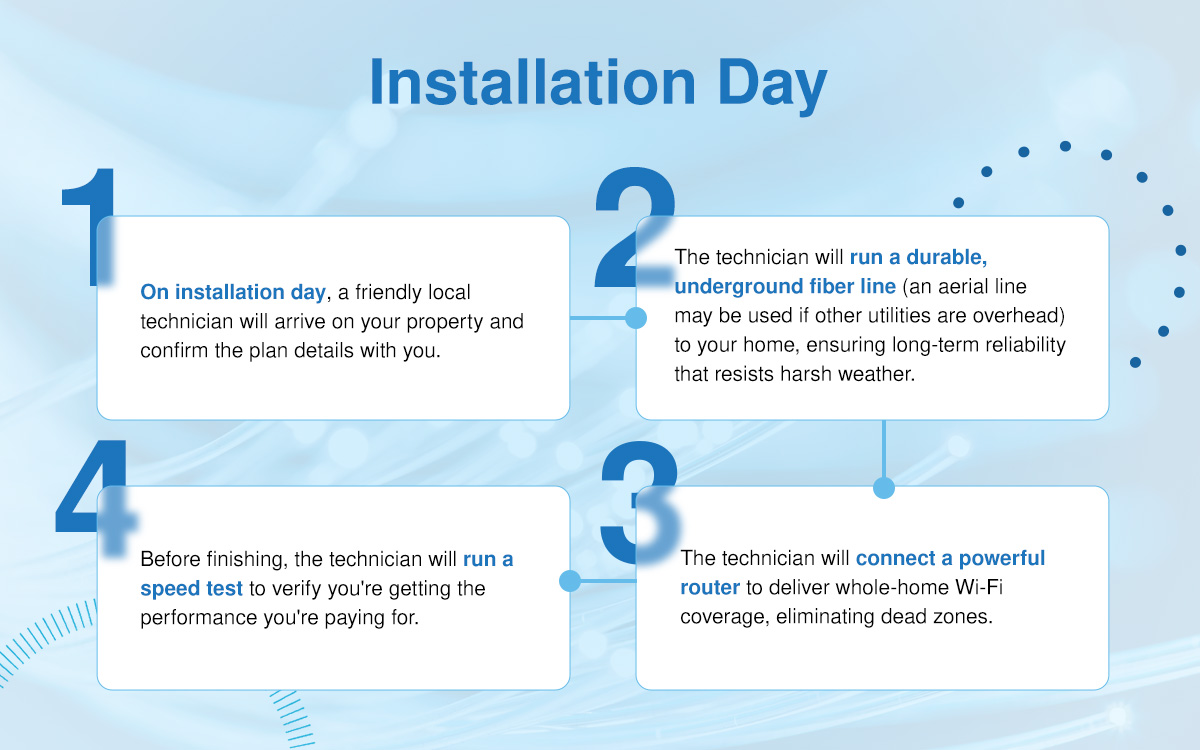
On installation day, a friendly local technician will arrive on your property and confirm the plan details with you. Instead of a rushed corporate installation, you'll enjoy a white-glove experience from someone who lives and works in your community.
The technician will run a durable, underground fiber line to your home, ensuring long-term reliability that resists harsh weather. Inside, they'll install an ONT, a compact device that functions as your modern modem. Next, they'll connect a powerful router to deliver whole-home Wi-Fi coverage , eliminating dead zones and providing every room in your house with a consistent signal.
Before finishing, the technician will run a speed test to verify you're getting the performance you're paying for. For a 100% seamless switch, ask your technician to set the network name and password to match your old network's credentials. Then, your smart TVs, speakers, thermostat and computers should reconnect automatically without manual adjustments.
4.Test Everything
Before parting ways with your old provider, take your new fiber service for a 24-hour test-drive. Use the internet as you usually do on all your devices. This testing period gives you complete confidence in the connection before you make a final commitment.
Make sure the speeds match the plan you selected by running tests during peak usage times. Make video calls on work devices, stream shows on your smart TV and encourage your kids to play online games. Reconnect all your smart home devices, including thermostats, security cameras, voice assistants and streaming devices, to the new network.
Let everything run for a full day to ensure total stability. You can manage your new home network and monitor connected devices using a convenient mobile app , which gives you control over parental settings, usage data and network security from anywhere.
5. Cancel Your Old Provider
Once you feel sure your fiber internet works perfectly, call your previous provider to cancel. They'll provide instructions for returning rented devices such as modems or routers.
Request a tracking number for equipment you ship back, and keep the receipt as proof of return to protect yourself from unexpected charges for unreturned items. When you receive your final bill, expect it to be prorated based on the date you canceled.
Now is also the perfect opportunity to cut the cord and embrace streaming services, which offer flexibility and often cost less than traditional cable TV packages. With fiber speeds, streaming is seamless and buffer-free.
Upgrade to Fiber Internet With Local Support You Can Count On
You don't need to jump through hoops to start reaping the rewards of rural fiber internet. Highline Internet is not a faceless corporation — we're members of your community. Our technicians live and work in the same rural areas we serve, which means you get personalized support from people who understand your needs.
We bring modern, reliable fiber connections to communities that have been underserved for far too long. There are never data caps, hidden fees or long‑term contracts designed to lock you in. Instead, you will enjoy dependable internet delivered through an underground fiber network that's far more resilient than older cable or DSL lines — especially during storms and outages.
Upgrading to fiber is also a long-term investment in your home. According to the Fiber Broadband Association, fiber access can increase property value by up to 4.9% , giving you a benefit that lasts well beyond the initial installation.
Are you ready for faster speeds, better reliability and a smoother online experience? Check your availability today. Highline Internet makes the transition simple with transparent pricing, local expertise and a white-glove installation process designed around your schedule. Contact us for answers to all your questions.